Documentation / Players
Build more. Repeat less.
Get started with Chisel, find a look you like, and get to know the tools that make building easier.
Install Chisel
- Install NeoForge for Minecraft 26.1.2. Chisel is built for NeoForge and does not run on Fabric or Quilt.
- Add Chisel and CTM to the mods folder. Chisel needs CTM to run, so make sure both are for the same Minecraft version.
- Launch the game. Check that both mods show up in the mod list before opening a world.
Crafting your first chisel
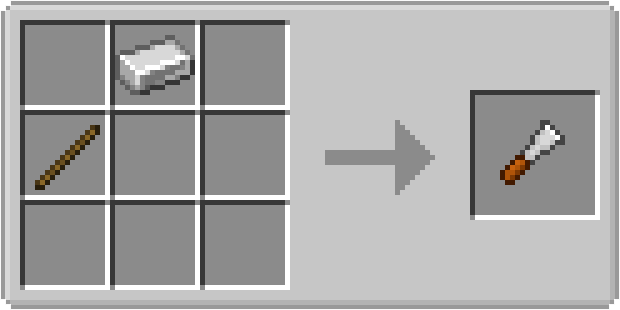
Craft an iron, diamond, or obsidian chisel and use it to open the Chisel menu. Place a supported block in the input slot, browse every variant in its family, and choose the pattern you want.
Preview first
When you place a block into the input slot you are greeted with a preview of what things will look like, choose between a multiple variations to see what you can build with it. Don't worry the chisel will only take damage once you make your final decision.
Can't find it?
Use the search field to find a exactly what you're looking for!
Bulk Chiseling
Hold shift and convert your entire inventory at once! No need to do one at a time, unless you want to of course.
Change your mind?
All you're doing is changing how it looks, if you want to change it back you can just chisel it again!
Chisel modes
In-world modes change the shape of the selection affected when chiseling placed blocks. Hold the configured mode-selection key (default shift), scroll to the mode you want, and release the key to select it. The world outline previews affected blocks before you act.
You can change blocks to a specific variant by placing it inside the chisel.
| Mode | Best for |
|---|---|
Single | The bread and butter, See a block change a block |
Row | Chisel 3 blocks in a horizontal line |
Column | Chisel 3 blocks in a vertical line |
Panel | Chisel a 3x3 square of blocks. |
Shapeless | Chisel up to 512 blocks in a 10 block radius. Will chisel all blocks if in the same family. |
Shapeless Exact | Chisel up to 512 blocks in a 10 block radius. Will only chisel blocks that are the same as what you hit |
Shapeless Flat | Chisel up to 256 blocks in a 10 block radius on a flat plane. Will chisel all blocks if in the same family. |
Shapeless Flat Exact | Connected groups when a rectangular selection is not useful. Will only chisel blocks that are the same as what you hit |
Tools beyond the chisel
Auto Chisel
Need a million stone bricks? Maybe you want a ton of glass? Doing stuff by hand takes forever so let the Auto Chisel do it for you while you focus on the part thats actually fun, building!
Speed Upgrade
Stacks up to 64, Will double the speed for each one you have. I promise you don't need more than like 5.
Reversion Upgrade
Disables the template slot. Will revert any blocks in the input area to the the base block for the family.
Automation Upgrade
Allows for automating the Auto Chisel with any type of I/O. (Pipes, Hopper, AE System, etc.)
Stack Upgrade
Will convert an entire stack of blocks at once!
Builder's Guide
Projects construction guides for shapes such as cubes, cylinders, and domes. Use it to establish the outline, then fill the visible positions with your chosen blocks. Right click to fill a ghost block with your desired block, Will only replace air.
Measuring Tape
Check the distance between blocks right in your world. Handy when you want to center a build or keep sections evenly spaced.
Offset Tool
Ever find that your massive fan just doesn't quite sit right? Use the Offset Tool to shift the texture to align it with the rest of your build.
Troubleshooting
A block isn't showing up in the Chisel menu
The block might not be part of a Chisel family. If you're playing a modpack, its author can add compatible blocks using Chisel's family tags.
Connected textures are missing
Check that CTM is installed and both mods are for the same Minecraft version. Try turning off resource packs, too, in case one is overriding the connected textures.
The game crashed
Open an issue with your exact mod versions and the full crash report or latest log. A screenshot helps with visual problems. If you can, try reproducing the problem with unrelated resource packs turned off.